Manual trading
How to read a liquidation heatmap (and where not to put your stop)
Price drops 2%, hits your stop to the tick, and turns straight back up. It felt personal. It wasn't. Your stop was sitting where thousands of other stops and liquidation prices were sitting. That cluster is fuel: when it triggers, it turns into market orders, and someone on the other side gets filled exactly where they wanted. If you can't see where that fuel is, your orders are part of it.
- A liquidation heatmap shows the prices where leveraged positions would be force-closed. Big clusters pull price towards them.
- Estimated maps model positions from open interest; on-chain maps (Hyperliquid, Lighter) read the real positions. Use both.
- Take profit in front of a cluster, keep stops beyond it, and look for entries after a cluster has been swept.
What a liquidation heatmap is
Every leveraged position has a liquidation price. If the market reaches it, the exchange closes the position with a market order. A liquidation heatmap, or liquidation map, plots how much money would be liquidated at each price, so you can see where those forced orders are stacked. The warmer the colour, the more money is waiting there.
Why price goes to liquidations
A liquidation is a forced market order. A liquidated long sells; a liquidated short buys. When many of them sit at the same price, reaching it sets off a chain: each liquidation pushes price into the next one.
Large players need size to get filled, and a liquidation cluster is the deepest pool of guaranteed size on the chart. That's why wicks so often reach a level, clear it and come back.
- Price reaches the first cluster of long liquidations. Each one is a forced market sell.
- Those sells push price into the next cluster, which triggers too. The levels disappear as price trades through them.
- With the fuel used up, there is nobody left to force out, and price comes back.
Two ways to map liquidations
Estimated liquidations
Modelled from public open interest on Binance, Bybit, OKX and Hyperliquid. When open interest grows while price trades at a level, new leveraged positions were opened there, and their liquidation prices are projected for every leverage level from 5x to 100x.
You can filter by leverage, by exchange and by when the positions were opened: last 24 hours, 3 days, 7 days or 21 days. A level disappears once price trades through it. It's a model, not real positions, but it covers centralized exchanges, where nobody can see the positions.
On-chain liquidations
Hyperliquid and Lighter are on-chain, so their positions are public. MyLiquidBot reads the real positions and uses the liquidation price each exchange reports, not a leverage formula that gets cross margin wrong. Each exchange also shows how much of its open interest is being tracked, for example "HL 91%", so you know how much of the market you're looking at.
| Estimated | On-chain | |
|---|---|---|
| Source | Open interest on Binance, Bybit, OKX and Hyperliquid | Public positions on Hyperliquid and Lighter |
| What it shows | Where positions could be liquidated, by leverage level | Real positions and the liquidation price each exchange reports |
| Strength | Covers centralized exchanges | Exact, including cross margin |
| Limit | A model: it assumes common leverage levels | Only the on-chain exchanges |
Use both. Where the estimate and the on-chain data agree, the level is much more likely to be real.
What you see on the MyLiquidBot chart
- Liquidation zones: bands where the money is concentrated, from green for the lightest through yellow to red for the heaviest. A few clear bands, not a chart painted red.
- On-chain heatmap: every public Hyperliquid and Lighter position, candle by candle. You see where liquidations were waiting in the past, where they wait now, and how levels build up and get consumed.
- Profile: every level as a bar on the right edge, so you can see the whole distribution.
- Whale lines: the largest positions, each drawn as a line at its liquidation price, plus the full Whales list.
- Executed liquidations: a skull on each candle where liquidations actually happened in the last 24 hours (Binance, Bybit, Hyperliquid, Lighter), plus pop-up alerts when a large one hits.
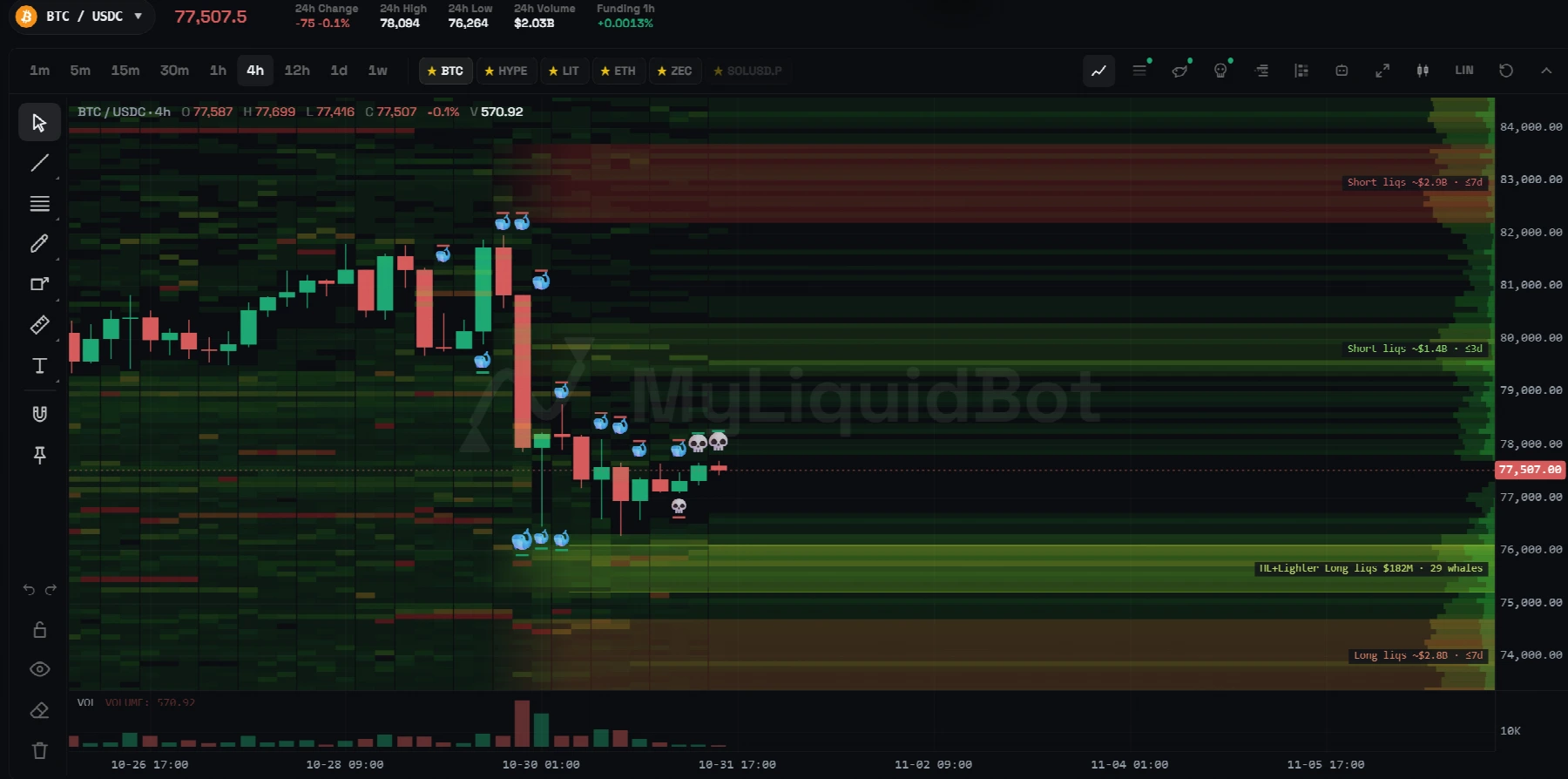
Presets set how far back the levels were opened and how far from price to look:
| Preset | Positions opened in the last | Distance from price |
|---|---|---|
| Scalp | 24 hours | ±3% |
| Intraday | 3 days | ±12% |
| Swing | 21 days | ±25% |
Or set your own: leverage levels, exchanges, how far back and how far from price.
How to trade with a liquidation map
- Take profit in front of the zone, not inside it. Price often turns once the cluster is cleared, so set your TP just before it and get filled on the way in.
- Don't park your stop in a cluster. That's exactly where price is pulled. Put it beyond the zone and size the position so the wider stop fits.
- Trade the sweep, not the approach. Price runs into a heavy zone, skulls print, the band fades: the fuel is gone, and that's where reversal entries come from. Chasing into the zone means joining the forced flow at the worst price.
- Read the imbalance. Heavy long liquidations below and little above means the easier path is down, to clear them. Clusters close by on both sides usually mean a wick to each.
- Check your own liquidation price. If it sits inside a big band, you're part of the target. Lower your leverage or move.
A worked example
Illustrative numbers: BTC at $80,000, Intraday preset. On-chain shows a red band of long liquidations at $78,400–78,700 and a yellow band of shorts around $82,000. The estimate agrees on the long side.
A · Stop inside the band
Stop at $78,600. The sweep to $78,500 takes you out right before the bounce.
B · Stop beyond the band
Stop at $78,100 with a smaller size. The sweep never touches you.
C · Entry after the sweep
Long after the wick, stop under it, take profit just before $82,000.
Long liquidationsShort liquidations
In A, the stop sits inside the heaviest band, exactly where the sweep is headed. In B, the same trade survives because the stop is below the band and the size is smaller so the loss at the stop stays the same. In C, you wait: price wicks into the band, skulls print and the band fades, and you go long with a stop under the wick and the take profit in front of the short cluster.
What a liquidation map can't tell you
A map shows where forced orders sit, not where price will go. A cluster can stay untouched for days, new positions change the picture all the time, and estimated levels are a model. Use the map to place your orders better, not as a signal on its own.
How to open it on MyLiquidBot
Without an account, the free BTC and ETH liquidation maps show the real Hyperliquid and Lighter positions and the largest order book walls, refreshed every few minutes.
The full chart adds every coin, updates every minute, every timeframe and the whole heatmap history, the estimated map from centralized exchanges and the executed liquidations. To open it:
- Create an account at myliquidbot.com.
- Connect a supported exchange in Account → Exchanges.
- Open Trade, open the chart and turn on the layers from the toolbar: Liquidation heatmap, Whales and Liquidations.
It's free: no subscription and no plan needed.
Frequently asked questions
What is a liquidation heatmap?
A chart of the prices where leveraged positions would be force-closed, coloured by how much money sits at each level. Clusters show where a move could trigger a chain of liquidations.
Are liquidation heatmaps accurate?
Estimated maps are models built from open interest and assumed leverage. On-chain maps read real positions on exchanges like Hyperliquid and Lighter, but only cover those exchanges. A level where both agree is the most reliable.
Why does price hunt liquidation levels?
Liquidations are forced market orders, so a cluster is a large pool of guaranteed size. Reaching it can trigger a chain of liquidations that pushes price further before it comes back.
Is the MyLiquidBot liquidation map free?
Yes. The BTC and ETH maps are public and need no account. The full chart in Trade needs an account and a connected exchange, with no subscription or plan.